2010-12-13

Why ScribeFire has a long way to go

Scribefire is an extension to Firefox, Chrome and Safari web browsers. I had used it in the past circa 2008 (so, an era, in Internet times). While it beats Blogger's (and a number of other, free blogging websites tools including wordpress), I had given up on it last time since I had run into intermittent problems (specifically around upload of images, losing posts while editing, etc)

Fast forward 2 years. I figure it would have had a number of improvements, and I'd be able to use it. Sure enough, I install it (and am pleased that it's available on Chrome as well - which I started using about a year ago). I decided to install it first of Firefox, just to see how things go.

  • I was able to authenticate myself with blogger
  • The interface seemed a bit better than before, even though the pane to write the post is still small and somewhat out of proportion
  • On Firefox, copy / paste of images work, but not on Chrome
  • When a post with images is published on Blogger on Firefox, images do not appear on Blogger.
  • When a post has images added to it on Chrome, it asks for access to Picasa Web Albums. All images are then uploaded to Picasa and referenced in the blog. Wonder why this doesn't happen on Firefox?
  • While trying to resize the "Post Content" pane on Firefox, if you accidentally click on the ScribeFire icon on the status bar, you lose all edits that you have made to your post. Without warning
  • The layout of the buttons (such as "Send to Blog") gets screwed up as you try to resize the ScribeFire panes
  • The small button above the ScribeFire add-on pane to close the add-on doesn't always work on Firefox
  • Since the button layout can get easily screwed up (at least on Firefox), you may find your post gets scheduled instead of being posted to blog
  • Adding links to posts is still archaic. At the very least, it should capture contents from the clipboard, making it easier to add hyperlinks
  • Users preferences should be remembered. For example, if an image is added to a post with orientation "middle", it should remember that as the default choice subsequently
  • Some keyboard shortcuts should be introduced for things such as adding hyperlinks. Where keyboard shortcuts already exist, these should be added to the tooltips
  • Posting with ScribeFire on Chrome doesn't always add a post to blogger. ScribeFire sometimes displays the posts as scheduled, but I couldn't find them on blogger.
  • ScribeFire doesn't seem to be handling the posting schedule properly. Two posts on the same day were posted in reverse order

On my wish list, I would also like to see:

  • A capability to add "References" to my post - this could simply be a bullet list of all links in the post (like another Firefox plugin, Zotero)
  • Ability to integrate with search engines to suggest more references on-the-fly

2010-12-01

Amazon EC2 Costs - A reality check

Ever since Amazon introduced its EC2 virtual computing environment, the disruptive pricing has been crucial to disrupting the market. However, it is quite easy for vendors / System Integrators to think moving to "cloud" would dramatically lower the costs, while in some cases, the costs may go up!

Here's what you see you on the EC2 website when you want to find the costs:


Looking at the pricing in the image above, you'd think the cost aren't going to be that high. Most of the people I have come across, only remember the soundbyte of 34 cents/hour.
However, simple math dictates the yearly costs could be fairly substantial as the table below depicts:
OS
EC2 Instace
Demand Type
Cost / Hr
Hours
Length
Total
Windows
HCPU Extra Large
OnDemand
$1.16
8,736
Year
$10,133.76
Windows
Extra Large
OnDemand
$0.96
8,736
Year
$8,386.56
Linux/UNIX
Extra Large
OnDemand
$0.68
8,736
Year
$5,940.48
Linux/UNIX
HCPU Extra Large
OnDemand
$0.68
8,736
Year
$5,940.48
Linux/UNIX
Large
OnDemand
$0.68
8,736
Year
$5,940.48
Windows
HCPU Extra Large
Reserved
$0.50
8,736
Year
$4,368.00
Windows
Large
OnDemand
$0.48
8,736
Year
$4,193.28
Windows
HCPU Medium
OnDemand
$0.29
8,736
Year
$2,533.44
Linux/UNIX
Extra Large
Reserved
$0.24
8,736
Year
$2,096.64
Linux/UNIX
HCPU Extra Large
Reserved
$0.24
8,736
Year
$2,096.64
Linux/UNIX
HCPU Medium
OnDemand
$0.17
8,736
Year
$1,485.12
Linux/UNIX
Large
Reserved
$0.12
8,736
Year
$1,048.32
Windows
Small
OnDemand
$0.12
8,736
Year
$1,048.32
The table above lists the costs of various "instances" of the compute units offered by Amazon, the hourly costs for them, and the corresponding yearly costs. These "instances" can have either Linux/Unix OS or Windows (priced differently), and you can even choose to "reserve" an instance for your use, which may even save some money. 
Clearly, computing cost on EC2 isn't as cheap as it seems initially. For example, something called an "Extra Large" instance will cost upwards of $8,000 per year, while "HCPU Extra Large" will cost over $10,000. Further, it isn't clear what this "instance" is, and what is included in an instance. So a little more digging is necessary to determine what is meant by, or included in, various instances. Here's a handy table describing the instances:

Instance
Memory (MB)
Virtual
 Core
ECU
ECU per Core
Storage (GB)
I/O
Platform
Micro Instance
633
1
2
-


32/64 bit
Small Instance – default
1740.8
1
1
1
160
Moderate
32 bit
Large Instance
7680
2
4
2
850
High
64 bit
Extra Large Instance
15360
4
8
2
1690


64 bit


High-Memory Extra Large Instance
17510.4
2
6.5
3.25
420
Moderate
64 bit
High-Memory Double Extra Large Instance
35020.8
4
13
3.25
850
High


High-Memory Quadruple Extra Large Instance
70041.6
8
26
3.25
1690


64 bit


High-CPU Extra Large Instance
7168
8
20
2.5
1690
High
64 bit
Cluster Compute Quadruple Extra Large Instance*
18432
8
33.5
4.1875
1690
Very Large
64 bit
Cluster GPU Quadruple Extra Large Instance **
18432
8
33.5
4.1875
1690
Very Large
64 bit
The above table lists the various instances offered by Amazon, the memory included (in MB) for each instance type, the virtual processors for each instance, storage (in GB) and whether the instance is available in 32 or 64 bit support. Also provided is a breakdown of Elastic Compute Unit (or ECU), per virtual processor core. The idea here is to provide all permutations of the most common computing needs that the large majority of consumers would have, and offer computing in those flavours. 
The GPU instance is a recent addition, providing graphic intensive core, therefore obviating the need for small businesses to buy specialised servers to perform graphic intensive tasks (such as computer aided animation or design, etc). However, you'll need to dig further to determine exact what is a virtual processor - and this is where wikipedia comes to rescue. An EC2 Compute Unit (in other words, the virtual processor in each of these instances offered by Amazon) is roughly equivalent of a 1.0 to 1.2 Ghz 2007 Xeon or Opteron processor. It has a CPU passmark of approximately 400. However, some websites report a lower passmark.
Armed with all that information, if you then decide to request Amazon for provisioning a set of instances to serve up your website, storefront, etc., beware! There are a lot more elements that make your final (monthly) bill. Here's a quick peek at the most common customer examples available at Amazon EC2 website:
Sample Scenario
Instances
EC2 Total
S3 Total
VPC total
DB Total
Cloud Front Total
Discount
Data
Total
Marketing Web Site
2 Large
1054.08
605.72
0
0
197.8
-4.5
74.8
1927.9
Web Application
5 Large 2Xlarge
4256.41
2771.12
471.5
434.9
0
-24.52
2274.19
10183.6
Media Application
None
0
42.02
100
0
853.33
-1.85
1.15
994.65
HPC Cluster
None
0
780.76
5510.4
0
0
-4.45
1117.7
7404.41
Disaster Recovery & Backup
None
1610.4
364.07
0
0
0
-4.47
318.05
2288.05
European Web App
None
2191.58
98.66
21.79
21.79
0
-26.32
463.95
2771.45
If you think the table above is scary, then..well yeah, it is. It contains a flavour of the variables that Amazon uses to calculate the price per month that it will charge you, and clearly there's more to the cost than merely the compute currency. Some of the key elements that go into it are:
  • Compute Unit (as we discussed)
  • Usage (in hours)
  • Location of usage (Amazon offers US East Coast, US West Coast, Europe and Asia Pacific
  • Additional Amazon services used, such as:
    • Elastic IP address remapping
    •  Amazon Elastic Block Store (EBS)
    • Elastic Load Balancing
    • Amazon CloudWatch
    • Amazon Web Services
    • Amazon S3
    • Virtual Private Cloud
    • etc...
Clearly, there is a lot more to Amazon's pricing than the promise of 10 cents/hour. Perhaps these are the variables that every Data Center administrator has to work with, when planning to install new equipment. However, to some extent, this disruptive pricing and offering requires a fairly steep curve for rest of the market. I suppose the initial adopters would be technology enthusiasts AND more importantly, competitors, which would do nothing but add fuel to the fire of Amazon's advertising for this offering! 
Next time - more details on the EC2 pricing!
–Elast

2010-06-20

rsync / grsync and exclude files

You'd think that these tools would be straightforward to use. Took me over 30 minutes to get grsync to work correctly for excluding some files from source.

This is the syntax you need (you can add this to "additional options" in grsync)

--exclude-from=

In the exclude file, you need patterns in the order:

*.exe
*.htm

(they don't work without the leading asterisk. go figure)

2010-01-08

Service Management

First in the articles in the series of Service Management, I have started delving into detail on IBM Service Management, called Integrated Service Management, or ISM. ISM is defined as the methods and software needed to assure quality service delivery and reduce infrastructure costs.

Benefits of Service Management include:
  • Improved service quality
  • Seamless Integrated processes across the business
  • Faster, more reliable service delivery
  • Improved efficiency and staff productivity
  • Minimized operational risk and exposure
  • Reduced costs
IBM's key differentiators are:
  • IBM offers the broadest, deepest and most integrated service management capabilities
  • ISM integrates Business and IT
  • Supported by best practices, methodologies and Services across industries
ISM is divided into seven value segments:
  1. Service Delivery and Process Automation - improves service delivery through repeatable processes, and manages the lifecycle of configuration items and the assets they represent.
  2. Service Availability and Performance Management - monitoring and managing of the mainframe, including resources such as operating systems to middleware, databases and Websphere support
  3. Storage Management - provide customers with visibility, control and automation of all aspects of protecting data, managing storage infrastructure and resources, and controlling the information lifecycle:
  4. Security, Risk and Compliance - helps clients secure their assets while also meeting various rules and regulations.
  5. Data center Transformation - delivers power management capabilities that effectively "green" datacenters
  6. Asset and Financial Management - encompasses all types of IT (hardware to software) and enterprise (facilities to transportation) assets, and how to efficiently manage their operation and cost
  7. Network and Service Assurance - provides all aspects of managing networks and service quality.

Useful Links
IBM Service Management
End-to-End Service Management Using IBM Service Management Portfolio

2009-09-10

Components of a Cloud Computing Model

This article provides the architectural overview of a Cloud Computing platform to communicate a brief and clear overview of the target IT system in a Cloud.

At the topmost level, every cloud can be viewed as:


Starting from the lowest level, here’s a brief description of various components:

System Virtualisation infrastructure

This is infrastructure components that provide virtualisation of a specific architecture (H/W or O/S), server, storage and network. This is the base layer that is “virtualised” into the cloud.

All components above this layer are enablers that make the cloud usable.

Installation

The installation component installs software on the managed environment.

Process Automation

Automated workloads for installation of software (which in turn, deliver a “service”).

Provisioning

Provision of network resources, software, servers/workloads, storage, etc. This component has pre-packaged workflows for common installation scenarios, delivered in a private cloud.

Authentication and Authorisation

Component which controls access

Virtualisation Management

Provides high-level management tools for dynamic manipulation of the virtualised environment.

Configuration management database

The central repository which stores the underlying configuration (such as software, server, storage and network), as well as access credentials, type of workloads provisioned, available, etc.

The OSS and BSS layer on top of this cloud then provides integration points for Service Providers and Service Consumers

2009-09-02

Test Drive the IBM cloud

In this article we will test drive an IBM cloud. First, get your account at IBM Developer Cloud

Apart from the demo video on that page, the bottom of the page has nice stats about the cloud such as:


Sign-up to create an account. Please note there's a delay between your account being created and it actually activated for you to be able to create any instances. To find out if your instance is active, click on the Account page. If you don't see the following "Access" section then you gotta wait (Or, you can browse the "Assets" Panel to see the various "cloud" images available to you, but more on that later):


You can now generate your own key pair. Make sure to save your key.

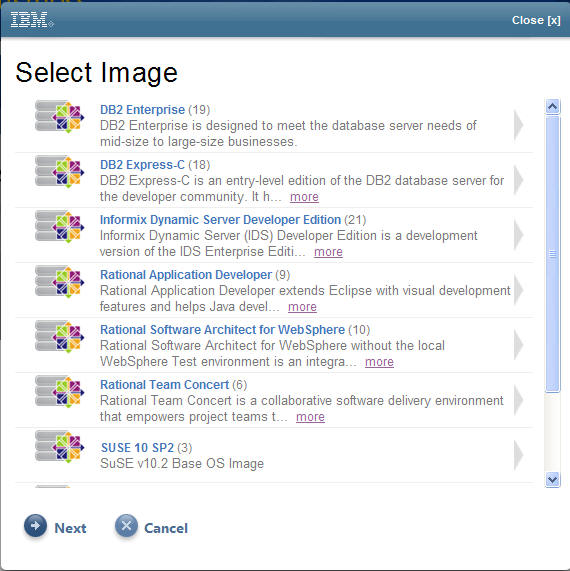
Go to the "Control Panel" and you will then see a link on the right to create an instance. Click then and well, create your instance selecting the image of your choice:


Once you create a cloud, give it a name, and it will be provisioned for you. As you can see, at the time, your instance will be deleted after 7 days.

After your instance is provisioned you will be able to see that in the "Control Panel" as well as connection details to the instance (such as IP address of the instance, the hostname, the base OS, date of expiration, etc).

At this point, if you want to use Putty, you will have to use PuTTyGen to convert the key to a format that putty understands, enable "Auto-login username" to "idcuser" (the default username for IBM clouds), and import the SSH-2 key to PuTTy and click "Open". In theory, you should be able to connect to your instance, unless the server is under maintenance (as it was in my case).

More to come as the cloud come up :-)

Types Of Cloud (Computing)

The long-held dream of utility computing has arrived and is here to stay, with some of the biggest players in the industry investing significant dollars. IBM has announced a raft of cloud computing services, and so has Amazon.

Fundamentally, all cloud services are derivatives of the following types:

1. Infrastructure as a Service (Iaas) - A typically virtualized platform is delivered as a service. This is where rather than purchasing servers or spaces in data center, you get a service delivery infrastructure delivered a service. Like any other service you have a Service Level Agreement (SLA) with parameters to measure QoS. All other aspects of cloud computing remain - dynamic scaling, multi-tenancy, etc.

2. Software as a Service (SaaS) - The combination of software and hardware is delivered as a service (something tangible and usable), by a provider. This service is hosted on the provider's data center (or in turn, another provider of IaaS). The model can be quite complex where the software application may be licensed by an Application Service Provider with the hardware infrastructure bundled (the ASP model, also called "pay as you go"), or a SaaS provider which licenses the application from a vendor, and bundles it with the hardware (though that's very rare).

References:

Software as a Service - Wikipedia
Truth about SaaS - CIO.com

2009-08-27

From ASP to Cloud

10 years ago, ASP (or Application Service Provider) model was the hottest thing in Silicon Valley. All sorts of names were into play - incumbents were soon followed by stalwarts of the industry in delivering software services over the web. Like most fads, it didn't last long, however, it did pave the way for its new avatar - cloud computing.

So what's changed?

For one, The Internet. It's more ubiquitous than ever, albeit in it's broadband format (than the clunky dial-up or ISDN), making it possible for (more) users to have access to services in a similar, and more importantly, acceptable time frame. Thanks to bloatware Operating Systems, we are all used to waiting a few seconds for our apps to start up - and faster Internet access has made it easier for services to be delivered over the web.

Web 2.0 - while the world still tries to figure out how that's different from the web in it's 1.0 incarnation, enhancements in CSS, Ajax calls and better support for Java and JavaScript in browsers make applications in a browser look (and feel) similar to native applications.

Acceptance - put simply, we have all become used to accessing remote services, such as checking our bank accounts. Paying bills online. Every company has a website, and more importantly, an Intranet - a corporate portal with majority of services available over it. This in turn has becalmed the apprehensions of the business user.

Google, Amazon and Salesforce.com - while the last one in the last is the biggest name to survive from the ASP era, the offerings from Google and Amazon have been paving the way for the world to get used to cloud computing. Google App Engine provides you a free quota of services and infrastructure available to you for use (with more available on purchase). Same goes for Amazon EC2.

But really, apart from that, not much has changed. Cloud computing providers are building on the ASP era:

Flexibility and virtualization - most services (or service containers) are provisioned virtually. They could exist on one or more machines, or as dynamic partitions on server (basically, "logical" partitions of a CPU - so small services could use as little as 1/10th of a CPU). Virtualization, is another nebulous term - it could be a Virtual Machine, Full virtualization or hardware-assisted virtualization, hardware virtualization (such as that of memory or storage) or application virtualization. Fundamentally, this ensures the cloud providers do not dedicate resources to one customer or service. But that brings us to the next point. Oh, and virtualization allows for scalability as well.

Multi-tenancy - by definition, cloud computing resources are shared among services offered. Technology available today makes that possible, and more importantly, secure. VMWare virtual machines allow you to run multiple (and different) "guest" operating systems on your "host" machine. Solaris containers (including zones) allow for operating-system level, disjointed user "spaces".

Dynamic provisioning - Though often confused with cloud computing itself, this is installation and configuration of software or even hardware on-demand. Again, technology exists today to activate pre-installed, but not used, CPUs, create partitions (or containers) and configure a workload of choice - all done remotely. And when not required, all of it can be put back into the "available" pool.

Grid computing - Again, sometimes confused with cloud computing, grid computing is the ability to harness powers of more than one computer as a simple computer.

All these factors have changed the face users perceive computing, and made cloud more accessible.